Two Codex Accounts, One Session History
Use CODEX_HOME for a second Codex login, then share only the session files you need to resume by ID. Here is the setup I use, what stays separate, and what I actually verified.
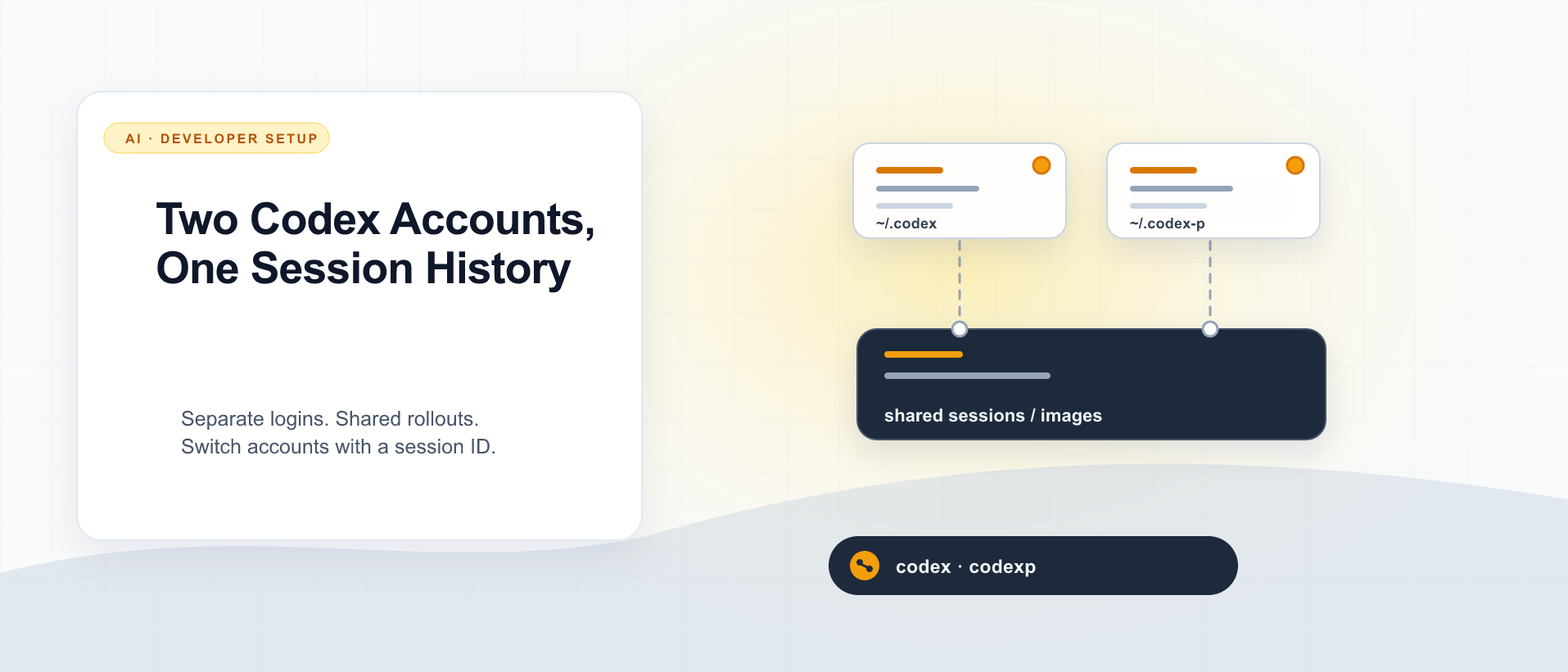
I wrote about running two Claude Code accounts on one machine in August. The useful idea was simple: keep the two logins separate, then choose which parts of the local setup should be shared. I now use the same principle with Codex and share the local conversation files too. I want to start a session under one ChatGPT account and continue it under the other by session ID.
My commands are codex and codexp. The first uses the normal ~/.codex home. The second sets CODEX_HOME to ~/.codex-p. Both invoke the same installed CLI. As of this article, the machine runs Codex CLI 0.157.1.
The practical result is:
SESSION_ID="paste-your-session-uuid-here"
codexp resume "$SESSION_ID"
codex  resume "$SESSION_ID"
I opened that codexp session with codex and saw its saved conversation. I exited without sending another prompt. That verifies loading the history, not a new model response under the second account. The setup below is about the local Codex CLI; it does not claim that every Codex app or cloud conversation uses the same files.
The boundary: one binary, two homes
CODEX_HOME selects Codex’s user directory. A different home gives the second invocation its own login, config.toml, history, indexes, caches, and other local state. On my installation the two homes each contain an auth.json; the files are separate and must stay that way. Codex also supports other credential storage modes, so check your own authentication settings rather than assuming every installation stores a token in that file.
Here is the zsh function in my ~/.zshrc:
codexp() { CODEX_HOME="$HOME/.codex-p" command codex "$@"; }In a new shell, codexp login signs in the second account. The plain codex command continues to use the first. The function is shell convenience; a script or launcher should set CODEX_HOME explicitly because it may never read ~/.zshrc:
CODEX_HOME="$HOME/.codex-p" codex resume "$SESSION_ID"The account is selected when the command starts. The session ID selects the conversation to load. Those are separate choices. Do not copy or symlink auth.json to make resume work.
First set up the second account
Start with an empty private directory, then log in through the alternate home:
mkdir -p "$HOME/.codex-p"
chmod 700 "$HOME/.codex-p"
CODEX_HOME="$HOME/.codex-p" codex login
Add the function to your shell file and open a new terminal. codexp --version and codex --version should report the same binary version. The two commands can have different config files: that is useful when one account needs a different model, status line, MCP connection, hook set, or permission policy.
Check codex login status and codexp login status separately. Give the alternate profile a visible cue in its own config.toml if the two terminal UIs look too similar. My earlier statusline article explains the value of that feedback loop; its Claude payload and script are not a Codex config recipe.
My ~/.codex-p/skills and ~/.codex-p/agents point to the primary home, and both homes point to the same user policy. That is a deliberate sharing decision, not a requirement for account switching. Only link first-party instructions you trust in both contexts. Keep credentials, MCP authorization, plugins, hooks, project trust, and permission settings separate until you have inspected what each one grants. A shared skill can contain local paths or commands that do not make sense for both accounts.
Project guidance belongs in the repository’s AGENTS.md, where either login can find the same rules while working on that checkout. This is the portable layer described in my cross-tool configuration guide. Avoid making a session transcript the only place a lasting project rule exists.
Choose whether conversations should cross accounts
At first I kept each profile’s sessions separate. That is the simpler choice when work and personal conversations must stay apart. In that setup codexp resume <id> only has codexp’s local session files, and codex resume <id> only has codex’s.
For my own two accounts, I wanted continuity by ID. Codex saves CLI rollouts under sessions/. Image generation can leave assets under generated_images/ that a resumed conversation may refer to. I merged the alternate profile’s existing files into the primary directories, checked for filename collisions and byte mismatches, kept a backup of the originals, then linked those two directories from ~/.codex-p to ~/.codex:
~/.codex/                 ~/.codex-p/
  auth.json                 auth.json          separate logins
  config.toml               config.toml        separate settings
  sessions/       <──────── sessions/          shared rollouts
  generated_images/ <────── generated_images/  shared image files
For a new alternate profile with no sessions or images yet, the linking step is short:
ln -s "$HOME/.codex/sessions" "$HOME/.codex-p/sessions"
ln -s "$HOME/.codex/generated_images" "$HOME/.codex-p/generated_images"
If either destination already exists, ln should fail. Stop there. Do not delete an existing directory to make the command pass. Close running Codex sessions, inventory both directories, copy unique files, compare the copies, and move the originals into a dated backup before creating links. That was necessary on my machine: codexp already had two rollouts and three generated images. The backup remains at ~/.codex-p/session-sharing-backup-2026-09-27/.
Sharing sessions/ makes the transcript available to both profiles. It also means either account can read conversations created under the other. Treat that as an explicit privacy choice, especially if one account belongs to an employer or client. I left history.jsonl, session_index.jsonl, and the profile databases separate. The concrete promise here is resume by UUID; I have not made the two profiles’ picker lists or search histories identical.
This is for two accounts used by one person on one machine. My multi-user Claude article explains why a second config directory is not an isolation boundary between different people sharing a Unix account. For a team server, give each person their own OS user and private home instead of sharing a session directory.
Resume with the account you want
Use the same ID with either command:
codex resume "$SESSION_ID"   # default login
codexp resume "$SESSION_ID"  # alternate login
Codex’s current resume --help accepts a session UUID directly and offers --all for the picker. The ID form is the dependable interface for this setup because the profiles retain separate indexes. Start from the project’s directory you intend to work in, and check the displayed directory before sending a prompt. The Codex project guidance explains that a resumed thread has saved history while Codex reads files from the current worktree.
Use one active writer for a session at a time. Quit the first CLI before continuing that ID in the second; two processes editing the same conversation are a poor way to discover how file and database locks behave. Also expect account-level differences: a model, connector, or permission available under one login may be missing under the other. Recheck the selected model and effective permissions after switching.
What I verified, and what I did not
I checked that both ~/.codex-p/sessions and ~/.codex-p/generated_images resolve to the primary directories, that each profile can see files created by the other, and that codex resume loaded the specific session created by codexp. The shell file passed zsh -n. This was a CLI 0.157.1 observation on macOS, not a compatibility guarantee for every release or platform. As I argued in Exit 0 Is Not Evidence, each check supports a bounded claim; a symlink and a successful startup do not prove the next model turn.
I did not merge authentication, configs, history indexes, or SQLite state. I also did not send a test prompt after switching accounts, so this post makes no claim about the next model turn or which subscription would be charged for it. Before relying on the workflow for important work, send a harmless prompt in a disposable session under each login and check the account and result yourself.
The design rule is the same one I used for Claude: share only the state whose sharing is the point of the setup. With Codex, the extra step is choosing whether session continuity is worth a shared conversation archive. For me it is, because I switch with an explicit ID. For someone who needs strict separation, two homes and two independent sessions/ directories are the better fit.
References

Keep reading

Agent Config, Installed Tool, and Live Behavior Are Three Different Things
A model or workflow can be correct in source and still be absent from the installed runtime. Verify each layer before claiming it works.
Running Independent AI Research Trials
Two isolated research environments can work from the same source material while keeping their analysis independent and reviewable.
I Tuned My Local AI Server. Then I Tried Ollama.
Vulkan, Flash Attention, speculative decoding, thread counts, and a custom service. After all that tuning, Ollama matched or slightly beat my Qwen3.8 setup on the same mini PC.
What did you take away?
Thoughts, pushback, or a story of your own? Drop a reply below — I read every one.
Comments are powered by Disqus. By posting you agree to theirterms.