The Bigger File Answered Faster: Inkling 2 Mini vs. Qwen on Shuri
Two models took up about 16 GiB each. One wrote three times as fast. Then Strata made the faster model quicker at reading and slower at answering.
The first useful question I asked Inkling 2 Mini was the sum of 17 and 25. It said 42. A calculator would have done it faster, but a calculator wouldn’t have given me a reason to spend the evening comparing GPU runtimes.
I wanted to know whether the mini PC in my homelab could run a model I’d actually want to wait for. The first surprise was that the slightly bigger file answered three times as fast as the Qwen model I already had. The second was that I could make Inkling faster at reading and slower at writing without changing the model file at all.
Same shelf space, different pace
Shuri is my Minisforum UM880 Plus. It runs Ubuntu on a Ryzen 7 8845HS with 64 GB of DDR5 and a Radeon 780M that borrows from that memory. Both models fit on the integrated GPU. The one labelled qwen3.8:27b in my local Ollama library was a 15.65 GiB Q4_K_M GGUF. Inkling was the 16.41 GiB IQ4_NL GGUF, about 4.5 bits per weight. Inkling GGUF downloads
At their measured generation rates, 128 tokens took about 31 seconds from Qwen and under 10 from Inkling, once generation began. Those are benchmark token counts, but the difference is easy to picture. Ten seconds is long enough to read the answer as it appears. Thirty seconds is long enough for me to switch tabs.
The file size tells me what I need room to load. The architecture helps explain how much work goes into a token. Qwen is dense. Inkling is a mixture-of-experts model, so it routes tokens through a subset of its weights. Thinking Machines reports 26.4 billion parameters in total, 3.4 billion active parameters, and 5.4 billion weight activations per token once repeat visits to layers are counted. I measured the whole setup, so I can’t assign the speed difference to any one of those numbers. Thinking Machines release notes · A primer on model files and mixture of experts
The faster engine lost the second half
I had Inkling running on llama.cpp with Vulkan when I came across Strata. Its Inkling engine could use the exact GGUF I already had. I paused llama.cpp, pointed Strata at the same file, and gave the Radeon 780M’s experimental HIP build a go. No second download and no new quantization. Strata v0.2.20 · Radeon 780M build guide
Strata read the 512-token prompt at 212.8 tokens/s, up from llama.cpp’s 160.49. On a 4,096-token prompt, Strata sustained 207.1 tokens/s and finished reading in just under 20 seconds. I could see the appeal for handing it a long document and asking for a short answer.
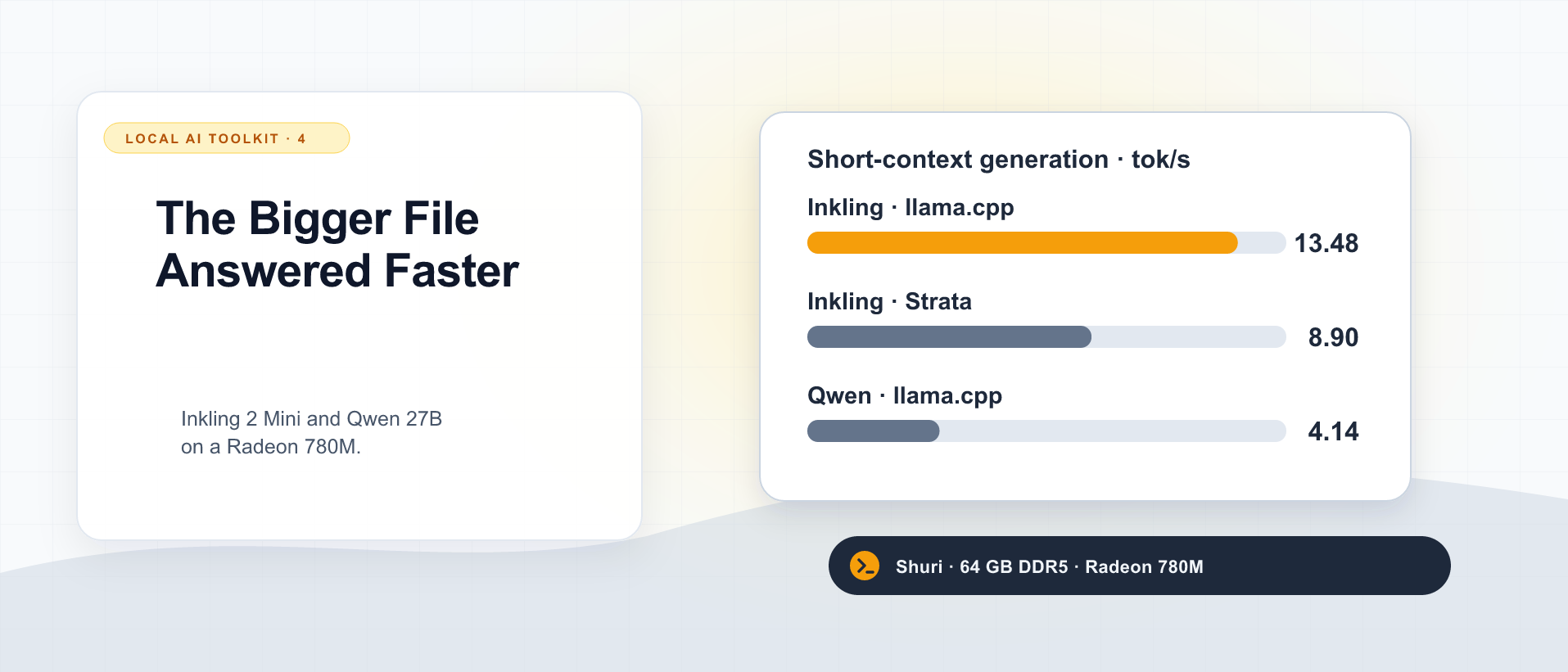
Then the answer started. Strata managed 8.9 tokens/s at short context, against 13.48 from llama.cpp. After a 4,096-token prefix it was 8.2 versus 11.35. For a typical back-and-forth with a short prompt, I’d give up less than a second of reading speed to get the answer several seconds sooner. That’s an estimate from the split tests. It also explains why I put the Vulkan service back.
The numbers, if you want to rerun it
| Model and runtime | Read 512 tokens | Write 128 tokens at short context | Write after a 4,096-token prefix |
|---|---|---|---|
| Inkling 2 Mini · llama.cpp Vulkan | 160.49 tok/s | 13.48 tok/s | 11.35 tok/s |
| Qwen 27B · llama.cpp Vulkan | 94.86 tok/s | 4.14 tok/s | — |
| Inkling 2 Mini · Strata HIP | 212.8 tok/s | 8.9 tok/s | 8.2 tok/s |
I ran both model files directly in llama.cpp b12651, using full GPU offload, Flash Attention, and eight CPU threads. The table shows averages of three llama.cpp runs and single Strata runs, with hipBLASLt disabled for the latter. The engines use their own benchmark programs, and Strata’s short-context decode starts from one input token. A real Inkling reply in the CLI ran at 12.7 tok/s including reasoning. These are throughput tests for text on one machine. Model quality would need a different experiment. llama.cpp b12651
Eight threads won the small tuning sweep. Four gave 12.44 tok/s and sixteen gave 12.73. Dropping GPU layers to zero in a separate 96-token test took Inkling from 13.40 down to 4.76 tok/s. To reproduce the main llama.cpp comparison, set model to each GGUF in turn.
llama-bench -m "$model" -p 512 -n 128 -ngl 99 -t 8 -fa on -r 3What stayed plugged in
Inkling now starts with Shuri and serves OpenCode and my three Hermes factories through llama.cpp’s OpenAI-compatible API. I set it up with two request slots, 65,536 tokens per slot, and quantized KV caches. The headline speeds are from the single-request benchmark. Qwen is still on disk whenever I want to try it again.
My next local model will get two stopwatch readings. One for how long it spends reading what I sent, and one for how long I spend watching the answer appear.

Local AI Toolkit: Runtimes, GPU Backends, and Model Files
4 parts in this series.
Three practical primers on choosing llama.cpp, vLLM, or LM Studio; understanding CUDA, ROCm, Vulkan, and Metal; and reading GGUF, quantization, dense-model, and MoE labels. A companion to the standalone model-architecture guide and Running AI Yourself.
- 01llama.cpp, vLLM, or LM Studio: Which Local LLM Tool Does What?
- 02CUDA, ROCm, Vulkan, and Metal: Why the GPU Software Stack Matters for Local AI
- 03GGUF, Quantization, Dense, and MoE: How to Read a Local Model Downloadprevious
- 04The Bigger File Answered Faster: Inkling 2 Mini vs. Qwen on Shuri← you are here
What did you take away?
Thoughts, pushback, or a story of your own? Drop a reply below — I read every one.
Comments are powered by Disqus. By posting you agree to theirterms.