Building My AI Shed: A 10G Server Backbone and 160 GB Across Two Minisforum Hosts
Why I moved my homelab to a 10G server backbone: an always-on AI shed on my tailnet, where agents, builders and local models share fast storage. Includes measured throughput.
DHH put the idea in one line:
Every developer needs an AI shed: An always-on machine running on their tailscale network where the majority of their herdr agents are running.
That is the reason for this upgrade. My coding and assistant agents should not live on the laptop I close at night. They should run on machines that stay on, reach shared storage quickly, and are available from anywhere on my Tailscale network.
In the first part of this series, the most interesting line in the network diagram ran through Asgard: a small XCP-ng host that also forwarded traffic for the NAS and Knowhere. That was fine for media and a few services. It was the wrong shape for an AI shed, where agents, builders and CI runners all hit storage at once.
The shed is now built: a dedicated server switch, a 10G link into the NAS, two Minisforum hosts with 160 GB of memory between them, and a 40G USB4 link joining those two hosts.
What runs in the shed
The agents are spread across several always-on hosts instead of one large machine:
| Host | Agent-facing work |
|---|---|
| talokan (UM760 Slim, 96 GB) | Research and discovery agent factories, a personal assistant agent, an OpenShell sandbox for untrusted agent runs, the image builder and CI runners |
| shuri (UM880 Plus, 64 GB) | Local inference on the Radeon 780M through llama.cpp, plus a K3s CI worker in Incus |
| knowhere | The dispatcher that hands tasks to agents |
| vyas (Synology RS1221+) | Shared storage, backups, a project-agent VM, and the Tailscale subnet router |
Vyas advertises the server network to my tailnet, so each of these machines is reachable from my phone or laptop without opening a port to the internet. That covers the “on their tailscale network” half of DHH’s definition. The “always-on” half is why the agent guests are set to start with their hosts.
The network as built
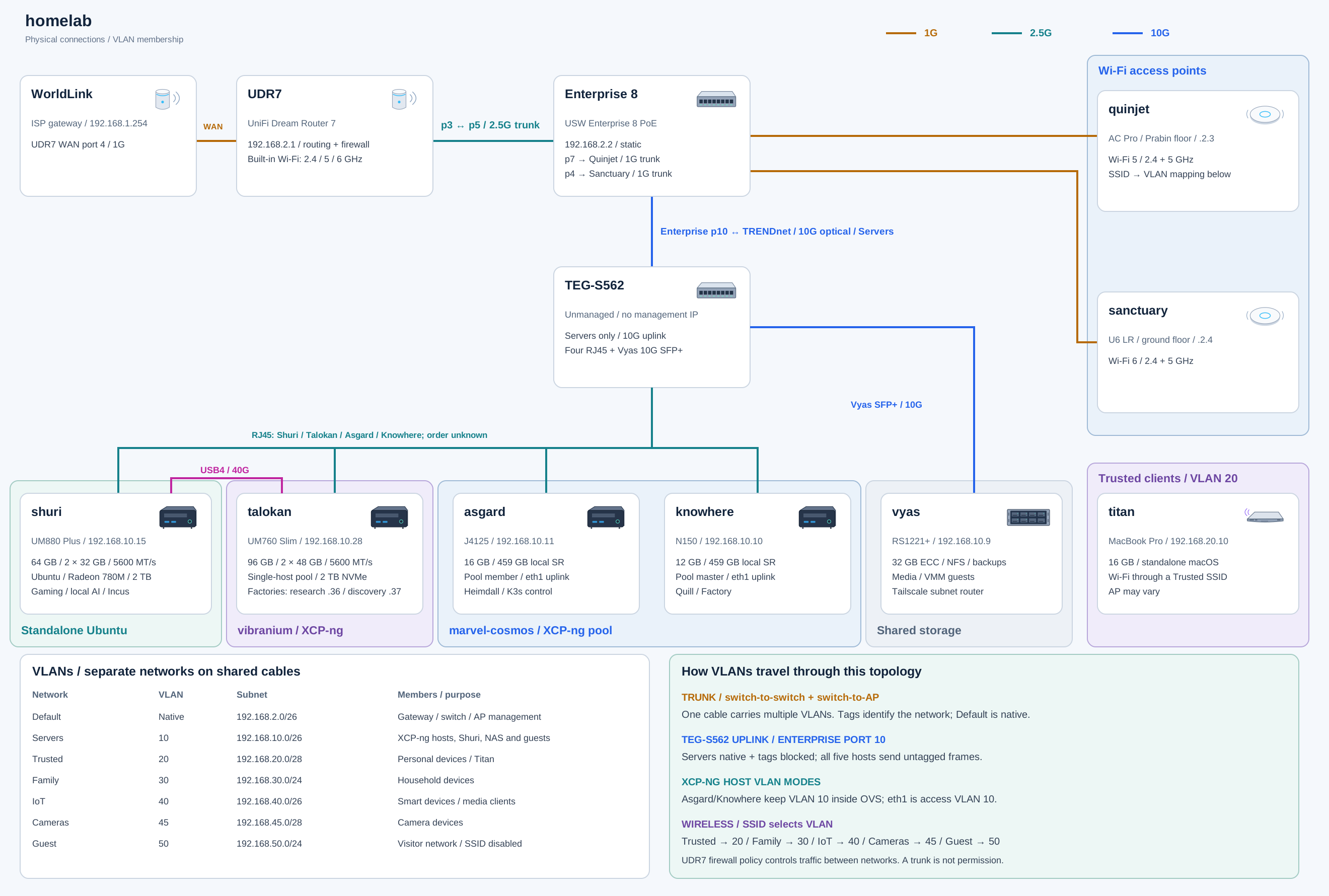
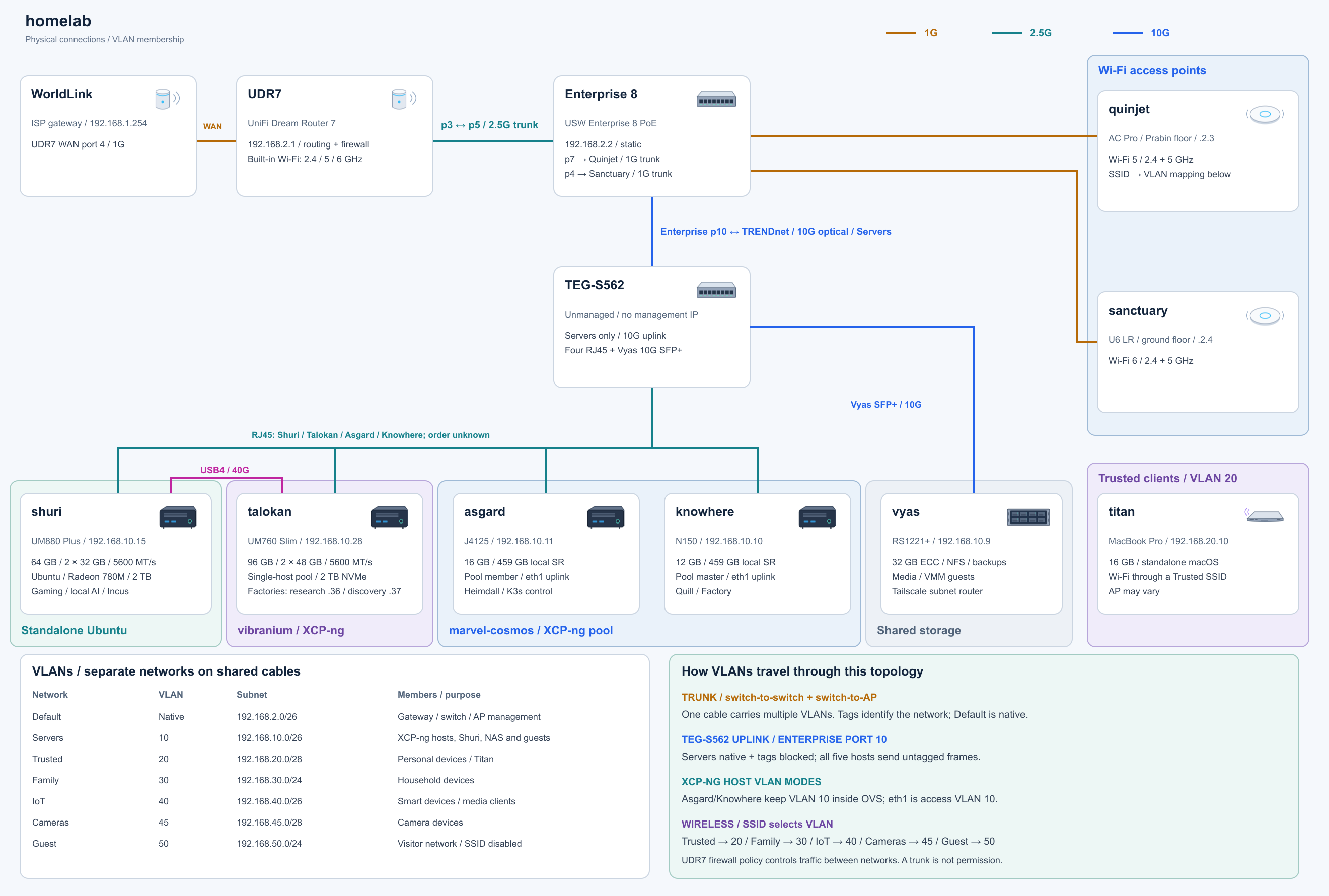
The TRENDnet TEG-S562 is the shed’s switch. It is unmanaged and carries only the Servers network (VLAN 10), untagged. One SFP+ port takes a 10G optical uplink from the managed UniFi Enterprise switch; the other connects Vyas’s 10GbE card. The four copper ports connect the compute hosts.
| Connection | Link rate | Job |
|---|---|---|
| Enterprise port 10 → TEG-S562 | 10 Gbps optical | Server-network uplink |
| TEG-S562 → Vyas | 10 Gbps SFP+ | Shared storage, NFS VM storage, backups |
| TEG-S562 → talokan | 2.5 Gbps | AMD XCP-ng host for agent VMs |
| TEG-S562 → shuri | 2.5 Gbps | Ubuntu host for local inference and CI |
| TEG-S562 → asgard | 2.5 Gbps | Intel XCP-ng host |
| TEG-S562 → knowhere | 1 Gbps | Intel XCP-ng host (gigabit NIC) |
| shuri ↔ talokan | 40G USB4 | Direct host-to-host link |
| UDR7 → Enterprise 8 PoE | 2.5 Gbps | Router trunk for every VLAN |
| Enterprise → both access points | 1 Gbps maximum | AP uplinks |
“10G” describes the backbone and the storage link, not every device. Knowhere’s gigabit NIC stays a gigabit NIC on a multigig switch. The UDR7-to-Enterprise trunk is 2.5G, so anything that leaves the server network, including internet traffic and routing to other VLANs, is still limited to 2.5G. Traffic between servers stays inside the TRENDnet and never touches that trunk.
Measured throughput
I tested the shed with iperf3 against Vyas, using four parallel streams per host. These are network numbers, memory to memory, with no disks involved.
| Test (Gb/s) | shuri | talokan | asgard | knowhere | Total |
|---|---|---|---|---|---|
| One host at a time, either direction | 2.35 | 2.35 | 2.35 | 0.94 | — |
| All four at once, writing to Vyas | 2.35 | 2.35 | 2.35 | 0.94 | 7.99 |
| All four at once, reading from Vyas | 1.54 | 1.37 | 2.08 | 0.81 | 5.80 |
Every host reaches its own line rate. When writing to the NAS, Vyas took the full 8 Gb/s that these four hosts can send, with its CPU around 79% busy handling the traffic. I can’t saturate 10G yet, because the senders add up to 8.5 Gb/s.
Reading from the NAS is the weak spot. Four hosts at once stopped near 5.8 Gb/s while Vyas’s CPU sat around 91% idle, so the processor is not the limit. My leading guess is the unmanaged switch dropping packets when 10G of traffic squeezes into 2.5G ports, but I haven’t confirmed it.
In practice, the disks will matter more. Vyas serves this cluster from four 5,400-rpm-class drives. My estimate, not yet measured, is roughly 3.5–5 Gb/s for large sequential reads from that array, and far lower for the random I/O of VM disks. A single 2.5G host can be fed in full, but several agents reading at once will likely hit the drives before they hit the network.
Two small hosts, 160 GB of installed RAM
| Host hardware | Installed memory | Installed SSD | Network |
|---|---|---|---|
| talokan / Minisforum UM760 Slim | 96 GB DDR5-5600 (2 × 48 GB) | 2 TB | 2.5GbE + USB4 |
| shuri / Minisforum UM880 Plus | 64 GB DDR5-5600 (2 × 32 GB) | 2 TB | 2.5GbE + USB4 |
Agents are memory-hungry in a boring way: each one is a VM or container with a runtime, a checkout, language servers and a test suite. The older 12 GB and 16 GB Intel hosts filled up quickly with persistent services. Talokan’s 96 GB lets each agent factory, builder and sandbox have its own VM with a clear budget. Shuri’s 64 GB is shared between the integrated GPU and local models.
Installed memory isn’t automatically available to every VM. Talokan deliberately overcommits CPU and memory for bursty guests, and each workload still has to fit its host.
An AMD pool and a standalone Ubuntu host
Talokan is the sole member of the AMD vibranium XCP-ng pool. Asgard and Knowhere form the Intel marvel-cosmos pool. XCP-ng does not support mixing Intel and AMD hosts in one pool, so the split is a hardware boundary, not a preference. Matching hypervisors alone is not enough; hosts must also meet the pool requirements.
Shuri sits outside both pools and runs Ubuntu on bare metal, which keeps the Radeon 780M directly available to games and local inference. Its Incus guests have their own management and lifecycle.
The USB4 cable between the two is a direct host-to-host route. Shuri uses the kernel’s native Thunderbolt networking; Talokan passes its USB4 controller through to a small gateway VM.
Keeping the unmanaged switch on one network
The TEG-S562 has no management interface, so its role stays simple. Enterprise port 10 sends Servers VLAN 10 as its native network and blocks tagged VLANs, which makes the TRENDnet a Servers-only access switch. Asgard and Knowhere keep VLAN 10 inside their Open vSwitch bridges and send untagged frames on the wire.
The managed Enterprise switch still handles the household side, where multiple VLANs and PoE matter. The Trusted, Family, IoT, Cameras and Guest networks never touch the server switch.
Titan stays on the macOS side
The clamshell 2018 MacBook Pro, titan, stays on Trusted Wi-Fi (VLAN 20). It is not a member of either XCP-ng pool and does not use a port on the TEG-S562. Its Colima environment is limited to two virtual CPUs, 4 GiB of RAM and a 60 GiB disk. It does light macOS utility work; agent workloads run on Talokan, and GPU workloads run on Shuri.
What the shed does not solve
Vyas is still my storage anchor and Tailscale subnet router, and Heimdall still supplies .home DNS and the reverse proxy. A faster network doesn’t remove those dependencies. If Vyas goes down, the shed loses its storage and its remote access at the same time.
The NAS is also a shared failure domain. A backup on a second pool inside the same chassis is still inside the same chassis. Two compute hosts are not evidence of application failover either; nothing here has been tested for that.
The next measurements are the ones agents actually feel: disk throughput on Vyas, NFS copies from a single host, and how the shed recovers when one of its dependencies disappears.
Why this shape
An AI shed doesn’t need to be one big machine. Mine is a few small, always-on hosts that share fast storage behind one Tailscale entry point. The 10G link goes where traffic converges, on the NAS. The 2.5G links go to the hosts doing the work, and the slower machines keep their roles.
I want to be able to say where each agent runs, how its data moves, and what happens when one piece is unavailable. The diagram and the measurements above are how I check that.
Coming next in this series
Next, I’ll add a Minisforum DEG1 dock with a discrete graphics card to the shed for local LLMs, and compare it with the Radeon 780M that Shuri uses today. After that, I’ll show how my software factories run inside these VMs: where each agent lives, how tasks reach it, and how its work turns into commits.

Building My Homelab
2 parts in this series.
Inside my home infrastructure: the hardware, network topology, storage and virtual machines, followed by the move to 10G networking and two Minisforum XCP-ng hosts.
- 01Inside My Homelab: The Hardware, Network, and What Runs Whereprevious
- 02Building My AI Shed: A 10G Server Backbone and 160 GB Across Two Minisforum Hosts← you are here
What did you take away?
Thoughts, pushback, or a story of your own? Drop a reply below — I read every one.
Comments are powered by Disqus. By posting you agree to theirterms.