Steering Hermes Agents From One Place
One shared room, @mentions and the Hermes web and mobile apps let me redirect four agent instances mid-task. The Google Photos to NAS migration shows how that works in practice.
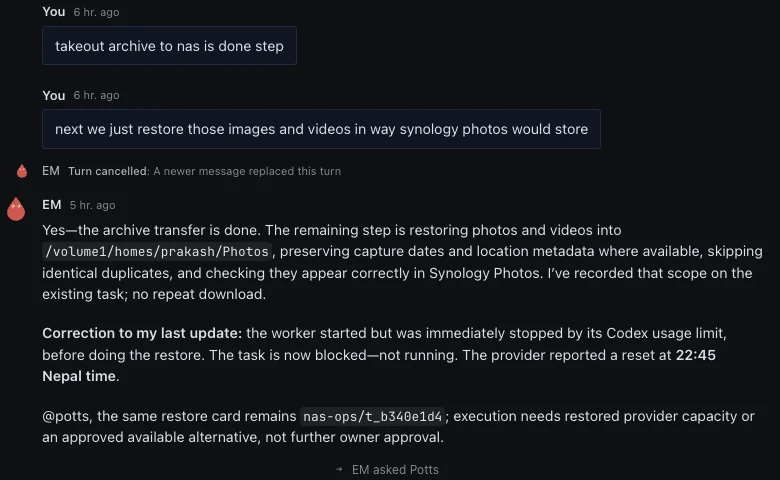
Part 2 kept four Hermes instances apart. This part is about talking to all of them from one place, and changing their direction while they work.
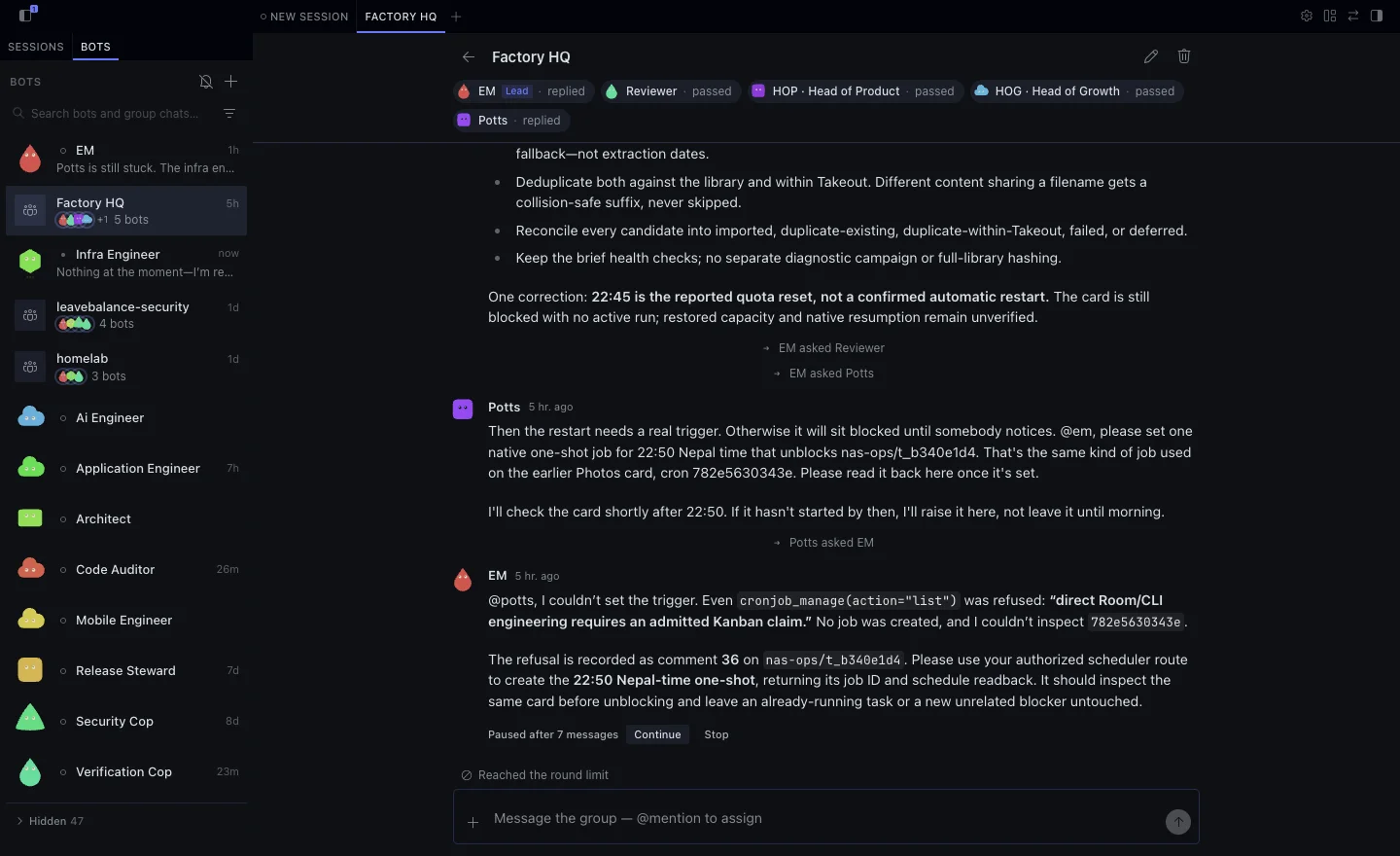
Factory HQ
The engineering gateway owns a room called Factory HQ. It has five members:
| Mention | Who | Runs on |
|---|---|---|
@em | Engineering manager, the room lead | Engineering |
@reviewer | Independent verification | Engineering |
@hop | Head of Product | Product |
@hog | Head of Growth | Growth |
@potts | My personal assistant | Assistant Hub |
A message without a mention goes to EM. A mention selects the member I name. Agents mention each other the same way, and the room shows each handoff as a small “EM asked Potts” marker under the message.
The room is for coordination. Work that needs doing goes onto a Kanban card on the owning board, and the room carries the receipts. EM has one tool, factory_hq_update, that posts a card’s status back into the room after reading it back from the board.
The web app and the mobile app
Newer Hermes versions ship a chat web app. Mine is served by the engineering gateway. I sign in, pick Bots, and see the rooms and every engineering profile in one sidebar. It works on my home network, over Tailscale, and over my router’s VPN when I’m out.
The official Hermes mobile app connects to the same gateway. It feels more like a chat app than a dashboard: agents and rooms as conversations, and a message box at the bottom. A lot of my steering happens there, from my phone.
Each instance also has its own dashboard for sessions, skills, cron and boards. I use those to inspect an instance, not to talk to it.
Worked example: Google Photos to the NAS
I asked Potts, in a direct chat, to move my Google Photos library to my NAS and free up the space.
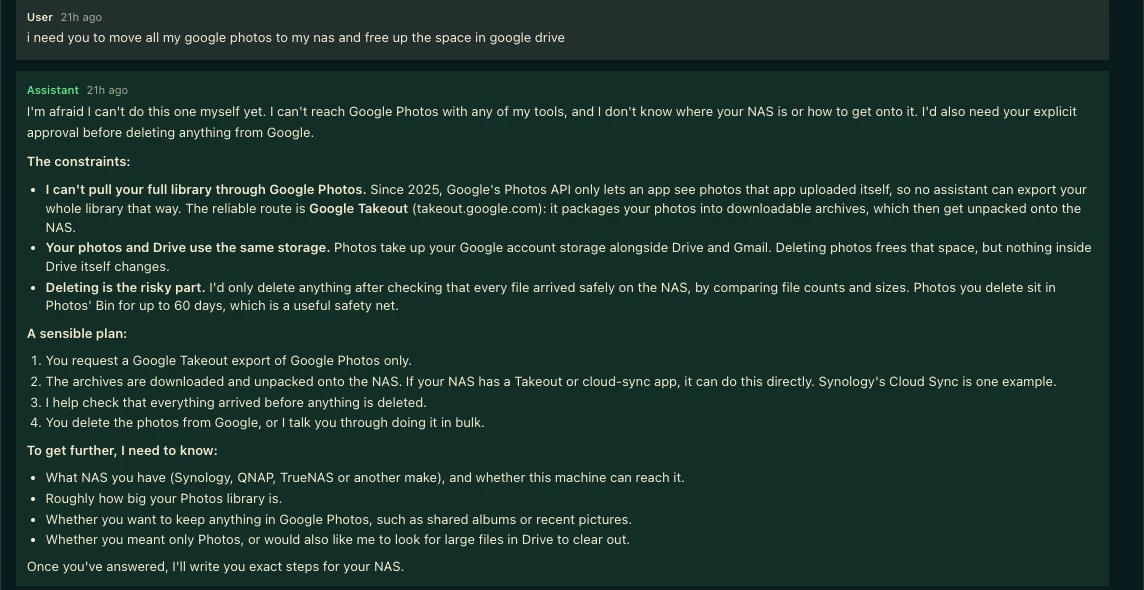
The answer was honest and useless. Potts had no route to the NAS and didn’t know which NAS I owned. It was right about one thing: Google’s Photos API only exposes photos an app uploaded itself, so a full export has to go through Google Takeout.
Engineering builds the route
Potts doesn’t fix servers, so engineering built the path it was missing:
- A small transport script on the engineering VM that accepts NAS tasks for one board,
nas-ops, and always assigns them to the existing infrastructure engineer. - A dedicated key on the assistant VM that can run only that transport, from only that address, with no shell.
- Two Potts skills:
potts-nas-operatorfor submitting and checking NAS tasks, andpotts-photo-migrationfor the migration itself.
The first live task checked that Synology Photos was running, that there was space, and that the operator could write to my Photos library. A second wrote a probe file, verified its hash and cleaned it up without touching my files.
The archives land
The Takeout export came as three archives, about 31 GB. They streamed from my signed-in browser straight to the NAS, into a staging folder beside the Photos library rather than inside it, so Synology Photos wouldn’t index ZIP files and JSON sidecars.
While that ran, a monitor job posted progress into my original conversation with Potts through a dedicated potts_photo_update tool. Updates arrived where I’d asked the question, not in a separate notification channel.
Steering in the room
The work then stalled on details I didn’t care about: a disk-space discrepancy, units, which folder layout to use. So I stepped into Factory HQ and said what I wanted.
EM restated the scope on the same card instead of starting over. Then the reviewer added two rules I hadn’t thought of. Takeout often stores the same photo in a year folder and an album folder, so duplicates have to be checked within the export as well as against the library. And two different photos can share a name like IMG_0001.jpg, so a file is skipped only when its hash matches. A differing file gets a suffix. Potts offered two folder layouts and recommended year/month, which matches how the Synology Photos mobile app files uploads.
That exchange took a few minutes. Without the room, each of those points would have been a separate round trip through a different agent.
The harness holds
Not everything moved. Potts asked EM to schedule a one-shot job to resume the import when the worker’s usage limit reset. EM couldn’t.
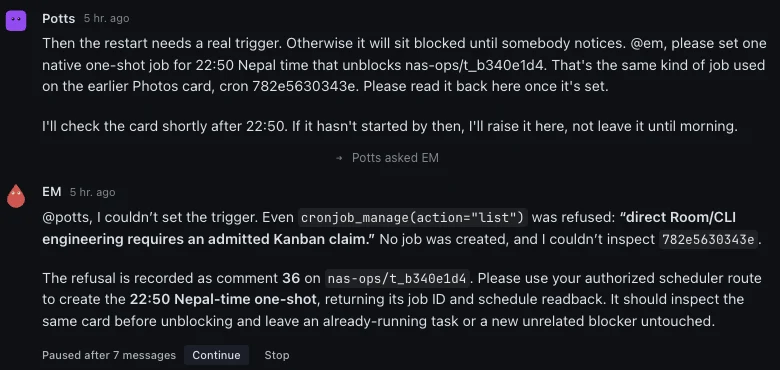
Engineering commands from a room turn need an admitted Kanban claim, and a chat message isn’t one. EM recorded the refusal on the card and asked for the authorised route instead. That’s the harness doing its job. It’s slower in the moment, and it’s why I trust what EM tells me.
When a fix lands, the conversation hears about it
One problem kept coming back early on. EM would ship a fix, but my chat with Potts never noticed. Potts kept answering from what it knew when the conversation started, and I had to tell it by hand that something had changed.
Three pieces closed that gap:
- Completion wakes the room. When an engineering card finishes, EM’s
factory_hq_updatetool posts a receipt into Factory HQ, and that receipt wakes Potts. In the test run, the worker finished, EM’s completion event reached the room, and Potts acknowledged it on the next event, with no polling and no nudge from me. - Updates go back to the original conversation. Potts’s
potts_photo_updatetool sends a labelled automation message into the exact conversation where I made the request, not a separate bot chat I would never open. - Fixes load without a restart. Plugins hot-reload, so a corrected tool reaches rooms that are already running. Work in progress doesn’t stop for a deploy.
Now an engineering fix shows up where I’m already talking, and the assistant carries on with it.
What the migration taught the agents
The rule that came out of this thread is now written into every NAS task brief and the engineering runbook: a ready email or a completed task does not prove the migration is complete. Completion means counted files, matched hashes and photos visible in Synology Photos.
Potts owned the request from start to finish. Engineering moved the three Takeout archives to the NAS, validated every archive against its receipt, and, once the library was in place, verified it: 16,175 photos and videos, 31.5 GB, every one matched by SHA256, none missing.
None of this was one prompt on a timer. It was one request, a route engineering built on demand, and a few corrections typed into a room at the right moment.

Running a Hermes Agent Factory
5 parts in this series.
Four Hermes instances on one model, kept apart by their harnesses: why agents are more than scheduled prompts, how engineering, product, growth and a personal assistant stay in their lanes, steering work from shared rooms, one skill registry for every harness, and the assistant-only calendar and inbox work.
- 01Agents Aren't Cron Jobs With a Personality
- 02Four Hermes Instances, One Modelprevious
- 03Steering Hermes Agents From One Place← you are here
- 04One Skill Registry for Every Harnessup next
- 05Assistant-Only Work: Calendar and Inbox on Potts
What did you take away?
Thoughts, pushback, or a story of your own? Drop a reply below — I read every one.
Comments are powered by Disqus. By posting you agree to theirterms.